











Before your next attempt
Manual preparation only. This does not read or save game progress. Checks reset on reload.
Know where you entered
Odio el chocolate makes a useful first question very simple: where did you enter this room? Before thinking about a perfect route, establish that one point of reference. Chocolate collection gives you reasons to move onward, but recognizing the way back helps keep an unfamiliar environment understandable. This guide approaches the game through entrances, boundaries and deliberate returns.
Home Is Where He Is visitors may recognize the unease of a space that looks ordinary without feeling secure. The connection is atmosphere, not identical mechanics. This is a Baldi's Basics mod by Wantho with active movement and collection, rather than another relationship narrative. Do not expect dialogue choices, a romance route or progress shared with the site's main game.
The embedded player opens the browser edition supplied by the source project. Original screenshots and the two selected videos are reference material, not a guarantee that every edition uses the same objectives or behavior. Let the current menu set the context. A good navigation habit can transfer between versions even when a memorized route cannot.
Build a small map in your attention
You do not need to draw the entire building before moving. Start with the entrance and one distinctive feature inside the room. After a short inspection, turn toward the entrance again. This establishes a local relationship you can use immediately. It is more reliable than a broad impression that you have been somewhere similar before.
A room may be familiar because of its appearance, not because you completed its search. Keep those ideas separate. If you leave early, mark it mentally as unfinished rather than checked. The distinction saves you from both unnecessary revisits and confident omissions. You only need enough information to explain why you would return.
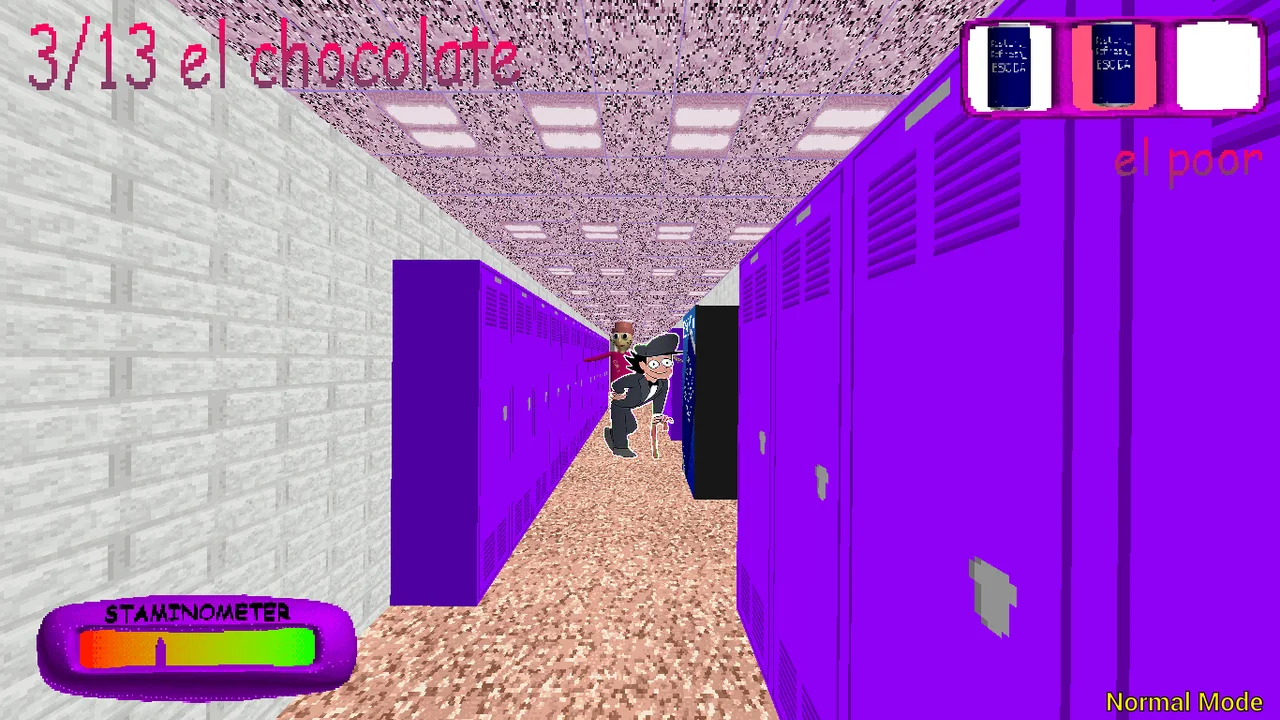
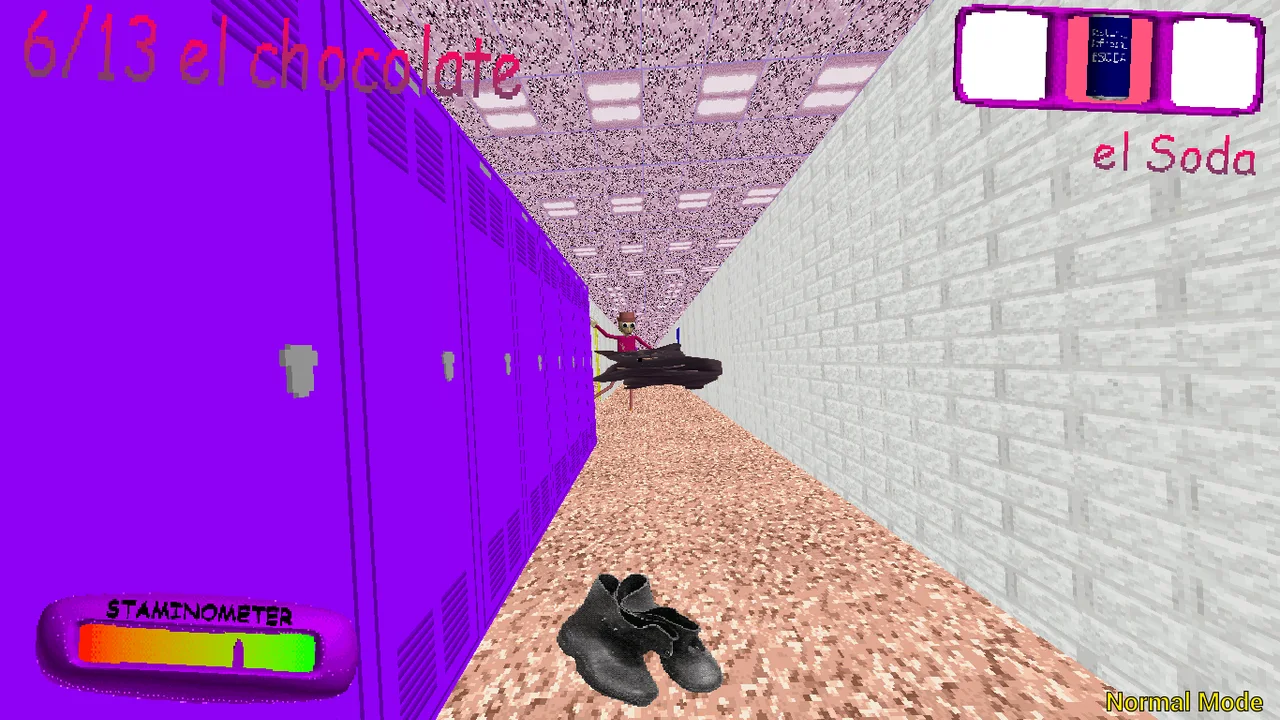
The locker-hall screenshot offers an example of repeated visual structures. Repetition can make direction harder to remember, so look for a transition or entrance as well as the furniture itself. The image is not a route diagram. It does not tell you where a threat is now, whether a particular door is usable, or which direction your live character is facing.
Learn the frame before the building
Click inside the player and test the basic movement described by the browser guide: W A S D with mouse look. Make a small turn toward something recognizable rather than spinning rapidly. If input does not reach the game, restore focus before changing your plan. Clicking surrounding website content can change where keyboard actions are received.
The listed left-click action handles doors and chocolate pickups. Aim, approach and interact, then inspect the result. A door that appears close in perspective may still need a better position, and a pickup is not confirmed merely because you clicked. Check for a visible change or an updated counter before deciding that the area is complete.
Use the current build's instructions when they conflict with a reference. This page has not verified every interaction on every device. It offers a practical starting point, not a substitute for the actual menu. Learning how the player responds in a quiet moment is more useful than discovering input assumptions while already trying to recover your orientation.
Make the return path part of the search
Before entering another space, briefly identify how you would recognize the room you are leaving. That does not mean the path will remain safe, only that you have a reference if you need to reconsider. Navigation is a sequence of local decisions, and each transition removes some details from your immediate view.
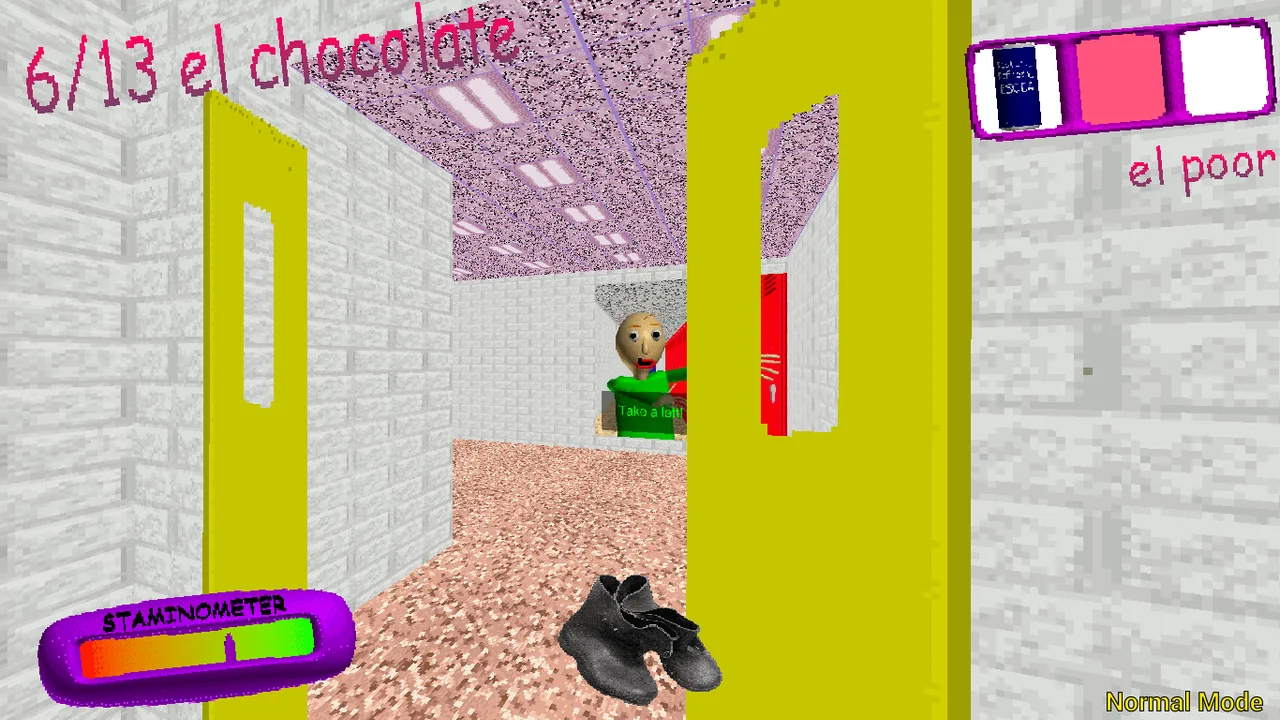
In the yellow-door reference, color is a landmark rather than an answer. It can help distinguish a place, but it cannot prove that the doorway is an exit or a refuge. Treat striking details as memory aids until the game establishes their function. This protects you from guides that turn an attractive screenshot into an unsupported walkthrough.
When pressure changes the situation, shorten your plan. Focus on the next readable position instead of trying to execute a long sequence from memory. The guide does not promise that turning back or continuing forward always works. It asks you to keep observing so your next action responds to the present scene rather than to an outdated intention.
Confirm what the collection display means
A collection counter provides evidence of a successful interaction. After approaching and clicking a chocolate, look for that evidence. If the number does not change, investigate input or positioning before treating the room as finished. This habit makes a search more dependable without requiring knowledge of hidden object locations.
Completion is a different question. Main-mode reference material includes an exit objective after collection, so reaching a count should not automatically end your attention. Continue following the game's instructions until it supplies a genuine completion state. The website does not receive your live progress and cannot tell you that a run has been won.
Do not generalize a partial count from a screenshot into a rule for all modes. The source records multiple modes and stage-dependent details in the original project. Your browser edition still needs its own observation. Attach any note about a target to the mode and circumstances where you saw it, rather than presenting it as a universal shortcut.
Save movement for a reason
The source guide describes Left Shift as sprinting. Watch the stamina display and decide where a faster movement should end. If you cannot name the destination, the first problem may be orientation rather than speed. Walking long enough to understand a turn can sometimes teach more than repeatedly rushing through it.
Practise a short familiar path when conditions allow, comparing ordinary movement with a brief sprint. The aim is control, not an exact speed calculation. Notice whether you can still turn toward the intended doorway afterward. This gives you a concrete observation to improve without inventing an enemy's statistics or claiming a guaranteed escape technique.
The same deliberate approach applies to inventory. One, two and three select slots, and right mouse uses the selected item according to the reference controls. Check the slot before using it. An icon seen in the inventory screenshot is not a complete explanation of its effect. Observe the actual result and preserve uncertainty when the result is unclear.
Keep mode names and expectations separate
The source material identifies Main, Baltazar, Low Cortisol and Triple Trouble. Read the text for your chosen option instead of deciding what it must do from the name. A playful label does not establish an easier complete run, and a dramatic label does not explain every mechanic. This guide does not invent a ranked difficulty ladder.
If you want to compare options, keep the input setup stable. Switching mode and moving from a keyboard to a phone at the same time makes differences harder to interpret. Begin by comparing the displayed instructions or opening objective. A limited, observable difference is more trustworthy than a sweeping conclusion after one unfamiliar attempt.
You can also decide that one mode is enough for a visit. Completion of every option is not a requirement for understanding the basic game. The manual preparation panel is meant to support your choices, not prescribe a challenge list. It has no connection to the host's save data, mode unlocks, inventory or chocolate counter.
Make technical recovery less disruptive
If the game stops accepting movement after you read the guide, click back into the frame before reloading. Focus loss is easier to correct than a lost session. If the player has its own pause or menu controls, read them before using a browser refresh. The surrounding site cannot promise to restore an interrupted run.
At first load, remember that game files come from a separate host. A blank area may reflect a slow or blocked request rather than a gameplay problem. Wait for meaningful loading feedback and use the direct-game link if needed. Fullscreen can enlarge the view, but it does not bypass a network failure or supply missing device controls.
Native Android images are not evidence of the browser edition's touch interface. Installing this site is not the same as downloading the original APK, and offline gameplay is not promised. Begin with a keyboard and pointer for the documented controls. A page fitting a phone screen does not establish that the complete game can be operated on that phone.
Bring back a useful memory
After a session, choose one detail that would make returning easier. It might be a landmark you recognized too late, an unfinished room or an input you confused with another action. A useful note identifies what to inspect next. It does not need an imagined map, an ending theory or a list of every turn you took.
The optional reference videos may contain spoilers and may show a different release. Use them selectively: watch how the player checks a room or confirms an interaction, then consider whether that behavior applies to your build. Pause the video before resuming so its sound does not compete with the game. Watching is preparation, not a replacement for observing your session.
The theme of a familiar place becoming uncomfortable can connect very different games. Here that theme is expressed through active searching and navigation. Keeping the distinction clear helps you decide whether this is the kind of experience you want today. When you prefer a slower story, return to the collection rather than treating a break as a failed objective.
When describing a route to yourself, use an action and a landmark together. Entered beside the lockers is more informative than a vague memory of a corridor. Keep the note tied to your actual run; it is not a claim that another player's layout will match. That small qualification prevents a personal observation from becoming an unreliable universal instruction.
Odio el chocolate video references
Optional footage selected by the source website. Spoilers and version differences are possible.
Questions before playing
Does this game share the Home Is Where He Is story?
No. It is a separate Baldi's Basics mod by Wantho. The connection is atmosphere, not shared characters or saves.
What should I remember about a room?
Where you entered, what you checked and whether something remains uncertain. Recognition alone does not mean the search is finished.
Does a distinctive door guarantee safety?
No. A landmark helps orientation but is not proof of an exit, checkpoint or safe zone.
What is the listed sprint key?
Left Shift, according to the browser reference. Follow the current menu if it specifies something different.
Can I rely on a phone layout?
A responsive website does not prove complete game input support. Native Android screenshots are not browser controls.
Does the direct link use a different host?
It opens the same supplied game directly. It can change the viewing context but cannot fix an unavailable host.
Are manual checks saved?
No. They reset on reload and do not synchronize with inventory, mode unlocks or chocolate counts.
Must I finish all modes?
No. You can use one mode to learn the controls and stop whenever you prefer.